Thursday, 15 July 2010

Video underlay

Not quite there yet.

What I'm trying to do is copy the raw TADS buffer into the diffuse COLOR0 buffer and render the symbology into the same bugger but into channel 2 (COLOR2). Texture channel 2  is used by the "fullbright" shader and mixes at full intensity. The net effect being a normal diffuse texture with full-bright symbology painted over it.

At the moment it's not working as intended. I need to go through the shader to check it's doing what I think it's supposed to do. And see if I need to just use multiple buffers and mix them instead of trying to draw directly into different stages. I'm probably missing an OpenGL command to set the texture target correctly.

It's getting late and I've had to do a lot or changes, our cockpit MPDs only have two knobs, the photos and source material I've been using to layout have three knobs. So there's a slight shift in positioning required.


Non of this does anything yet except the "VID" button that toggles the current TADS buffer. This is the new vector font/glyph system in use. I've yet to add the various button "specials" such as menu nagivation arrows, but the toggles work. The FOV shouldn't be in the raw TADS buffer, need to switch that.

The FMS toggles on the left will interface to the flight model.

I have to say the bitmap fonts looked just as good, if not slightly better when used at the same size. It was a pain adding new glyphs though, here I can add anything I can code with GL commands.


TrackIR remains a tangled mess of wires but I managed to assemble it to test and discovered that I'd not added the Track offsets to the cockpit cam. Quickly fixed that.

Some improvements to the MPDs

Added a simple frame-skip to MPD draw method, they don't need to be updated every single frame and it squeezes out a little extra. Found a "toob" video in which you get a couple of frames of the UTIL page. Anti-ice and FMS options, presumably this is where you can toggle pitch roll and yaw augmentation. Well seems like a good place to add that and we will need to flag some FMCS values for HTR which can auto-trim. Turning that off in the UTIL page will be handy. Looks like "NOE?" at the bottom too. No idea what channel that's supposed to be.

Got some strange problem with my matricies with the new vector glyph render, fixing that this morning. Will update with a screen-shot when fixed. 
Noooo, a totally numb-nutz error. My old OpenGL line macro uses integer verts, switching to floats. Oh man, how dumb.

PC froze unexpectedly this morning. It hasn't done that in ages.

Wednesday, 14 July 2010

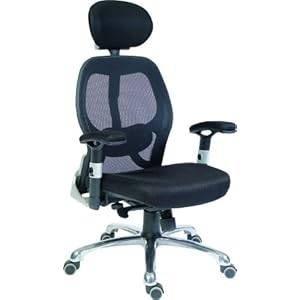
I need a new chair

My chair's really bad and falling apart. Went looking online, some nice ones that might be good for my back but I saw this one,from Amazon.co.uk  oh boy, to bad it doesn't come with Kevlar plates and a cup-holder.


This one is quite nice too...bloody expensive though...


Guess I'll end up with this one...

Tuesday, 13 July 2010

Quick update

Monday was one of those email days.

Future Tech

As director I'm looking beyond Combat-Helo, the future of the game and where we want to make improvements. One major improvement I'd like to see is the terrain rendering part of the engine. Make it more flexible, scalable and efficient. We've been looking at different engines and technologies, none of them are suited for flight-simulation out of the box. As much as we'd like to license those for use in a future commercial project they are either not ready or unavailable for license.

To satisfy requirements post Combat-Helo we require the ability to model the whole of the earth and stream in data for ground detail. There's potential to do that with the current engine by paging in ground object data with  a curved terrain mesh (think of a skybox that's curved into a sphere, but used for terrain). There are several interpolated LOD methods. The Terrain Augmentation Program is to be an ongoing side-project and not to interfere with Combat-Helo development.


Vector Graphics and Display Lists

I was looking over our Apache MPD (multi-page display) code, there are items I left out simply because I didn't have a handy symbol or character. Also the amount of updating required is a little inefficient. MPD updates were scheduled to be part of an optimisation pass later in the project but since I was adding the FCR and TADS symbology I feel justified in bringing that forward to make it easier.

Currently the MPDs use a co-ordinate system with 0,0 in the centre of the screen, with -1.0 being the left edge, +1.0 the right side. With +1.0 and -1.0 top and bottom respectively. This allows for resolution independent rendering. However some elements such as the Leadwerks bitmap fonts required converting to a standard co-ordinate system. Bitmap fonts don't scale well.

I've just completed coding a complete alpha-numeric font with symbols that mimic closely the current Apache MPD looks. All using vectors and OpenGL Display Lists (which are sort of pre-compiled commands), runs pretty fast and looks not too shabby. The MPD text and symbols are now fully scalable, also being pure OpenGL they are freed from needing the 3D engine and will run on a modest laptop.

Things left to do,convert existing code to use new VectorFont class, use more Display Lists for page elements. I was adding the FCR (back) into the game while I was away last week but it's aged so much it's worth starting over.

Sensors and Equipment

Regardless of the current Apache capabilities which are not in the public-domain, our Apache will track and classify up to 256 objects (thank you AABB for making it so easy). It's currently magic, meaning instant and no regard for signal strength or LOS. This will be sorted out later. Just needed something to display on the TSD, FCR etc.

David has been looking at the crews survival equipment. Something you can whip out to find out where you are. We know we'll want to have at least one weapon (a sidearm) and smoke signal flares for dropping a coloured smoke emitter.


Saturday, 10 July 2010

Combat-Helo to use HTR technology for flight model

I'm happy to announce that Combat-Helo will incorporate Frederic Naar's HTR Helicopter Total Realism technology for advanced helicopter flight dynamics. (link: Hovercontrol forum, HTR section). Developed as an external physics model that interfaces with Microsoft Flight Simulator via Pete Dawson's FSUIPC, HTR is an impressive implementation of blade theory using door-stopper text-books that designers of helicopters use as source material.

Fred invited me over for a few days for a mutual show-and-tell and I got to see first hand how detailed the model is from the author, who better? First with the Bell 206, which had a tendency to side-slip to the right as weight comes off the skids,  which left unchecked could potentially result in a fatal roll-over. Then I got a lecture on stabiliser wings and how vertical stabilisers depending on angle of airflow go from "sail area" to a wing generating lift. Blade flap and pitch is calculated per physics update, the amount of detail resulted in me experiencing a full frontal happy-attack.

After the Bell 206, Fred introduced me to an early Apache flight-model. I didn't find flying with a Microsoft Sidewinder easy, also I'm now used to flying with my joypad (I have shame). Stick in hand, trying desperately to keep the nose on a tree while slipping sideways to gauge the tail drag and weight, with limited success. Apache seemed to make all the right movements with changes to collective and airspeed. Even attempting the classic Apache hammerhead turn, HTR delivers sweat inducing concentration required for advanced helicopter flight. HTR also offers stabilisation and a most impressive auto-pilot function, checking boxes required for Combat-Helo's assisted flight mode. Trim seemed to be a non-issue except when the autopilot was flying to a stable-hover when the pilot was fighting excessive trim while attempting to slow down.

Given that HTR has to work within the limitations of Microsoft Flight Simulator, the implementation for Combat-Helo allows us to use even more parameters; feeding information about local terrain conditions for calculating updraughts, downdraughts , a detailed powertrain simulation as well as the ability to monitor rotor-behaviour via the nausea inducing blade-camera.

The flight-model should also be able to handle a load carrying CH-47, applying all the right moments of inertia. Pretty elegant stuff, a masterful use of OOP.

With Fred's addition we have completed the triad of physics, systems and technical art.

Finally I'd like to thank Frederic and family for their hospitality as well as the staff of Corte Dei Tusci hotel who were always friendly and manage to create the most amazing foods daily.

Monday, 5 July 2010

Light amplificiation

Today I added a postbuffer pixel shader to do light amplification for ETADS. Based on Geeks3D lightamp shader and modified for Leadwerks Engine it actually performs amplification by sampling the source pixel and if it's below a threshold, boosts the pixel intensity. Pretty neat.

These are tests, the left half is the amplified area, right side is ambient light.


The the first greyscale image has the polarity reversed. Into the mix I added a scanline mask with animated noise. The ETADS mask looks pretty good although I'm using a 'scope' mask here which more interesting visually.

The last shot shows more of the noise distortion that makes the image 'buzz'. This is almost ready to drop into the TADS class.

As for thermal imaging, we would need to add heatmaps as secondary UVs or fake it using some heat lookup. This is adding a level of complexity I don't want to pursue at this time as we could spend years throwing in tiny amounts of detail most gamers are not going to need.

This amplification shader allows us to give some threshold and boost control to the gunner so they can apply some measure of skill in finding ground units visually in poor lighting conditions.

*edit*

After some consideration I think some attention to thermal signatures would be good after-all. This could be done by adding an "objectname_intensity.dds" map to texture channel 4 or 5. Then modify the base Leadwerks pixel shader to boost the intensity of the pixel from that channel. It shouldn't be too hard to take an existing diffuse texture map, desaturate and reduce the brightness to almost nothing then airbrush in some intensity levels.

This would work well with the light-amplification post processing shader too.

Saturday, 3 July 2010

Acting!

As I sat down to implement the generic event system I was reading Game Coding Complete which discusses something similar, the Actor class. I was reinventing the wheel...badly. The wheel is overrated as an  invention. By far the greatest invention was the second wheel, lets face it, the unicycle isn't the most practical form of transport.

I digress. Actors. If you want to know more about them see Actor model at Wikipeadia

Then I came across this public domain implementation by Otus which also has a remote sockets version. Should work nicely as we need these to fire n-times every t-seconds for displaying alerts.

Also David worked on analogue flight gauges. There's different ways you can implement gauges. Did we want lighting? A glass face? My initial though was to build them like real instruments with different layered discs (hi-res textures with alpha) rather than 3D objects. Looks like we're going 3D for now, the kinds of instruments we have don't need anything complicated.